
How to Turn On Subtitles on IPTV: Step-by-Step Guide

How to Turn on Subtitles on IPTV

Yeah IPTV TV  – How to Turn on Subtitles on IPTV ? – To turn on IPTV subtitles, start playing a channel or video and show the playback controls. Look for Subtitles, Captions, or CC, then select an available language. If there is no such option, that channel may not provide captions or your player may not support them. Exact menu names differ between apps and devices. 

Choose your preferred language from the available list, then adjust font size and color if needed. Most apps linked to your IPTV subscription make this process straightforward, though specific steps may vary depending on the device and platform you’re using.

How to Enable Subtitles on IPTV Smarters

Open the IPTV Smarters app on your device (Set-Top Box, Smart TV, Android, or iOS).

Start a channel or video, open the playback controls, and look for Subtitles or CC; some versions also have caption preferences in their Settings menu.

How to Turn on Subtitles on IPTV

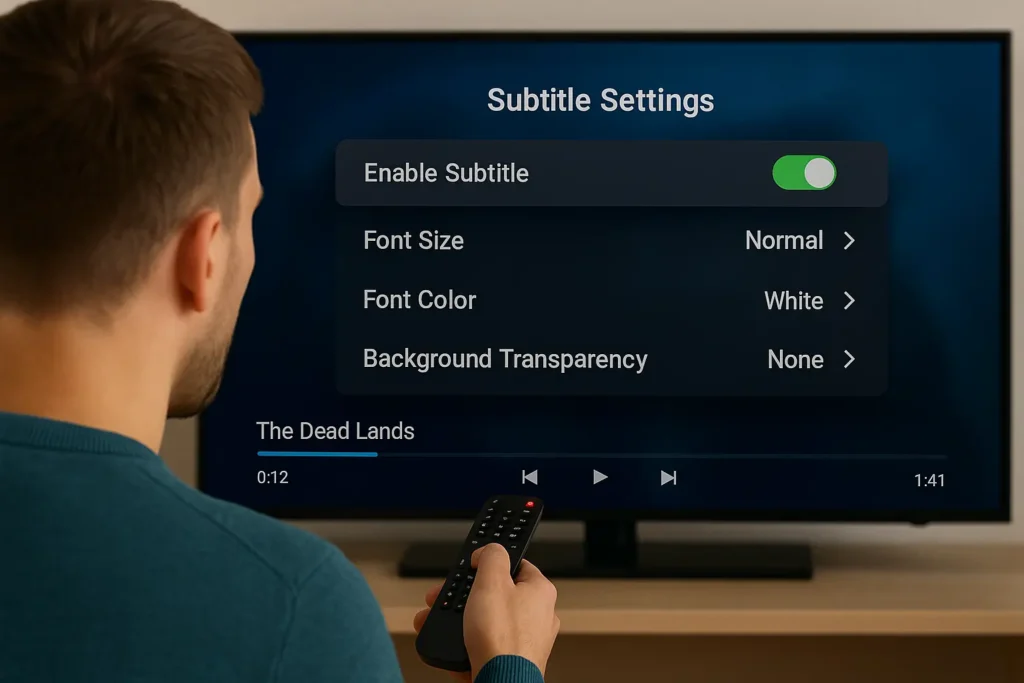
Look for the option “Subtitle Settings.”

How to Turn on Subtitles on IPTV

Choose “Enable Subtitle” (or “Disable Subtitle” if you want them off).

How to Turn on Subtitles on IPTV

Customize subtitle appearance by adjusting:

  • Font size
  • Font color

Background transparency

Save your settings and return to playback.

Configuring Subtitle Settings on Different Devices

Your device type determines exactly which steps you’ll follow to configure subtitle settings for IPTV. Check your device compatibility first, as older models might’ve limited options. You’ll access subtitle preferences differently across platforms:

  • Smart TVs: Press the settings button, navigate to accessibility or display options.
  • Streaming boxes: Open system settings, select captions or subtitles menu.
  • Mobile devices: Tap the screen during playback, select the CC icon.
  • Web browsers: Right-click the video player, choose subtitle options.

Once you’ve located these settings, you can customize font size, color, background opacity, and language preferences for optimal viewing.

What to check when an IPTV subtitle track is missing

Open the subtitle menu while the channel or title is playing and check whether it offers the language you need. Try a second title in the same app. If subtitles work on one title, the first stream may not carry that track.

If subtitle options are missing across multiple streams, check the playback settings and app version for your device. Follow the IPTV player setup guides for device-specific menus.

How Do You Get IPTV ?

How Do You Get IPTV ?

How to Get IPTV: Devices, Apps and Setup Quick guide: To get IPTV, select a service with content you are authorized to watch, use a compatible device and install a

Read More »

Yeah IPTV - Frequently Asked Questions

Yeah IPTV is trusted by thousands of IPTV fans globally. Don’t settle for cheap IPTV services that freeze and buffer — get a reliable provider with top performance and unbeatable value.We are here to help you 7 days a week and respond within 24 hours. Plus, you can find most answers to your questions right on this page.

Are IPTV Subtitles Available for Live Broadcasts and Sports Events?

Yes, you’ll find subtitles for many live events, though availability varies by provider. Sports commentary subtitles aren’t always guaranteed. Check your IPTV service’s live broadcast settings menu and look for the CC or subtitle icon during streaming.

Do IPTV Subtitles Consume Additional Internet Bandwidth or Data?

You’re probably wondering about bandwidth concerns while streaming. IPTV subtitles don’t significantly increase data usage since they’re text-based files. Most subtitle formats like SRT only add 1-2KB per minute to your stream’s bandwidth consumption.

Can I Add My Own Subtitle Files to IPTV Content?

You can’t directly add external subtitle files to most IPTV streams. However, some advanced players support subtitle formats like SRT. Check your app’s file compatibility settings or use VLC player for local content with custom subtitles.

Are IPTV Subtitles Synchronized Differently Than Traditional Cable TV Captions?

Don’t put the cart before the horse—yes, you’ll notice differences. IPTV’s subtitle accuracy depends on streaming protocols, causing synchronization issues more frequently than cable. You’ll need to manually adjust timing settings when delays occur.

Is There a Legal Requirement for IPTV Providers to Offer Subtitles?

Yes, you’ll find legal implications require IPTV providers to ensure subtitle accessibility in many countries. Check your region’s broadcasting regulations, as they typically mandate closed captions for streaming services to accommodate hearing-impaired viewers’ needs.